
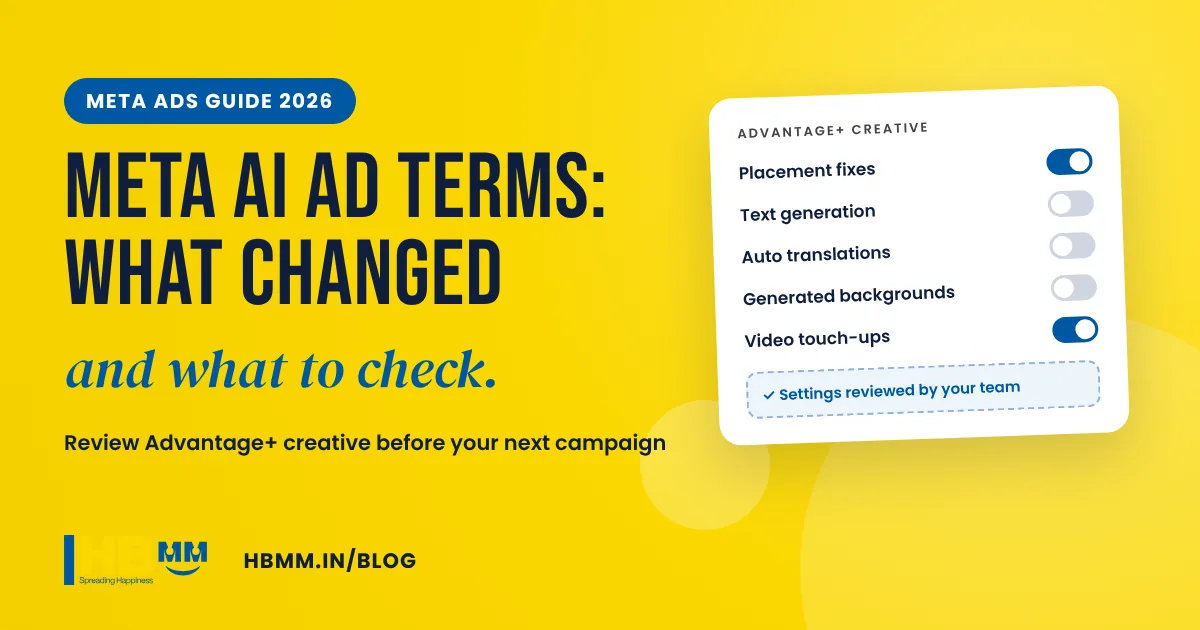
If you run Facebook or Instagram ads for your business, the rules changed this month. Meta’s updated Commercial Terms for businesses took effect on 20 November 2026, after being moved from the original date of 30 October. The headline change is a new section on AI features: Meta’s tools can now optimise, enhance or create parts of your ads, and the terms make clear that the business, not Meta, carries the risk of what those AI features produce. This guide explains the Meta AI ad terms in plain language, which Advantage+ creative enhancements to check, and a practical review routine for business owners and marketing teams in Ahmedabad, across India and beyond.
Short answer: Meta’s updated Commercial Terms (in effect from 20 November 2026) add a section on AI features. As reported by Reuters and Inc, it says Meta’s AI tools may make mistakes and that the advertiser is responsible for the risks of those features and the content they produce. Continuing to use Meta’s business tools counts as accepting the terms. The practical response is to check which Advantage+ creative enhancements are switched on in every live ad, turn off anything you have not approved, review AI variations before they run, and keep a record of what you approved.
In this guide
- What changed in Meta’s AI ad terms?
- Why the Meta AI ad terms matter for Indian businesses
- Advantage+ creative enhancements to check
- How to review your Meta ads in 7 steps
- Meta crawlers and your website
- Checklist: protect your brand in AI-assisted ads
- Should you stop using Advantage+ altogether?
- Frequently asked questions
This article is general information, not legal advice. Read the terms yourself and speak to a lawyer for anything specific to your business.
What changed in Meta’s AI ad terms?
Meta publishes separate terms for businesses that use its products, including the Commercial Terms and the Self-Serve Ad Terms that apply when you buy ads in Ads Manager. In October 2026 Meta previewed new versions of these terms. Press reports said they would apply from 30 October; Meta then told Reuters it was moving the date to 20 November to give it time to explain to partners what was changing and what was not. Inc’s report on the change sums up the concern many advertisers have.
Based on that coverage, the main points for advertisers are:
- A dedicated AI features section. The terms describe AI features that can optimise, enhance or create content for your ads, and say these features may make mistakes and may not always produce accurate, complete or suitable results.
- Responsibility sits with the business. The reported wording says the business is solely responsible for, and assumes the risks of, the AI features and any content that results.
- Acceptance by use. There is nothing to sign. If your business keeps using Meta’s business products after the effective date, you are treated as having accepted the updated terms.
- Features can change. Meta can change, limit or stop individual features, which matters if your campaigns depend on a particular AI tool.
- Crawling of business websites. The terms also cover Meta’s crawlers accessing websites linked to your products and services to improve its advertising and business products. More on that below.
Reports differ on how much of this is new compared with the previous 2024 terms, particularly on indemnity wording. That is a good reason to read the current text on Meta’s site rather than relying on summaries, including this one.
Why the Meta AI ad terms matter for Indian businesses
For a manufacturer in Ahmedabad, a clinic in Gandhinagar or a D2C brand selling across India, the risk is practical rather than abstract. Meta’s generative tools can rewrite your headline, generate a new background behind your product, translate your text or summarise your offer. Most of the time that is helpful. Sometimes it is not. A few examples of what can go wrong:
- A generated text variation makes a claim you cannot support, such as “guaranteed results” or “lowest price in Gujarat”.
- An automatic translation into Hindi or Gujarati changes the meaning of a medical, financial or legal statement.
- A generated background places your product in a setting that is misleading or off-brand.
- A summary drops an important condition, such as “for selected models only” or “T&C apply”.
Under the updated terms, a claim like that is your problem to manage, even if Meta’s AI wrote it. Businesses in regulated sectors such as healthcare, pharma, finance, real estate and education should be especially careful, because Indian advertising rules and sector regulators already hold the advertiser responsible for what the ad says. Our guides for healthcare and pharma marketing and real estate marketing explain why accuracy matters so much in those categories.
Advantage+ creative enhancements to check
Advantage+ creative is the group of automatic optimisations Meta can apply to your images, videos and text. Some are simple formatting changes; others use generative AI to create new material. Meta’s spokesperson told reporters that individual Advantage+ features can be switched off in Ads Manager at any time. Here is a practical way to sort them.
| Type of enhancement | Examples | Risk level | What we suggest |
|---|---|---|---|
| Formatting and placement fixes | Cropping or expanding an image to fit Stories and Reels, small brightness or contrast adjustments, adding music to a static image | Low | Usually fine to keep, but preview every placement |
| Text generation and rewriting | Alternative primary text and headlines, enhanced call to action, text summaries | High | Turn off unless someone reviews every variation before it runs |
| Translations | Automatic translation of ad text for other languages | High for regulated claims | Use your own approved Hindi, Gujarati or other language copy instead |
| Image and background generation | New backgrounds behind products, generated image variations, image expansion | Medium to high | Keep only for simple product shots, and check that products and logos are shown correctly |
| Video touch-ups and generated video | Animating images, generated video from stills, automatic edits | Medium | Preview before launch; avoid for ads with technical or medical content |
Meta’s menu names and the exact list of enhancements change from time to time, and some enhancements can be switched on by default for new ads. Do not assume last month’s settings still apply.
How to review your Meta ads in 7 steps
This is the routine we recommend to clients. It takes an hour or two for a small account and becomes a quick weekly habit after that.
- List every live campaign and ad. Export the list from Ads Manager so you have a starting point.
- Open each ad and find the Advantage+ creative settings. At ad level, expand the creative optimisations and note which ones are on.
- Turn off what you have not approved. Start with text generation, translations and generated backgrounds. Keep placement fixes if your previews look right, because switching everything off can make ads display badly in Stories and Reels.
- Check your ad account defaults. Look for account-level creative feature settings that switch enhancements on for new ads, and set them to match your policy.
- Preview every placement and variation. Look at Feed, Stories, Reels and right column previews, and read every text option Meta shows you.
- Re-check after edits and duplicates. Duplicating or editing an ad can bring enhancements back. Make this part of every launch checklist.
- Keep dated screenshots. Save what was approved and when. If a complaint ever comes up, you can show what you agreed to and what you switched off.
Meta crawlers and your website
The updated terms also refer to Meta crawling websites associated with a business’s products or services, to improve its advertising and business products. Meta’s own web crawler documentation lists the bots it uses and what each one is for:
- FacebookExternalHit builds link previews when your page is shared. Meta says it may bypass robots.txt for security or integrity checks.
- Meta-ExternalAds crawls for advertising and other business products.
- Meta-ExternalAgent crawls for uses such as training AI models or indexing content.
- Meta-WebIndexer helps Meta AI cite and link to content in its answers.
- Meta-ExternalFetcher fetches individual links when a user asks, and may bypass robots.txt.
You can block individual crawlers with a disallow rule in your robots.txt file, and Meta says changes can take up to 24 hours to apply. Think before blocking everything: blocking the link preview crawler can stop your pages showing properly when shared on WhatsApp, Facebook and Instagram, and blocking the indexer may reduce your chances of being cited in Meta AI. Decide crawler by crawler, the same way you would for Google and ChatGPT. Our guide on getting recommended by ChatGPT and AI Overviews covers the wider question of AI crawlers.
Checklist: protect your brand in AI-assisted ads
- Write down an AI policy for ads: which enhancements are allowed, which are not, and who approves exceptions.
- Keep approved claims in one place, including the exact wording for offers, conditions and regulated statements.
- Give Meta good source material. Strong original photos, clear product shots and your own video reduce the need for generated content. See our product photography and video service.
- Brand rules for AI: colours, logo use, tone of voice and words you never use. Our guide to brand guidelines for the AI era explains what to include.
- Agree responsibilities with your agency in writing: who reviews AI variations, how often, and what happens if something slips through.
- Review the terms once a quarter, since Meta can update them again.
Should you stop using Advantage+ altogether?
Not necessarily. Meta’s automation, including audience and placement automation, can help smaller budgets find buyers more efficiently, and simple formatting fixes make ads look better in each placement. The point of the new terms is not that AI features are bad. It is that you cannot treat them as someone else’s responsibility. Use automation where you can check the output, and keep tighter control where a mistake would be costly: prices, health claims, legal conditions, technical specifications and anything in a regulated sector. If you also advertise on Google, the same thinking applies to AI-generated assets there; our guide to Google AI Mode ads in India covers that side.
Frequently asked questions
When did Meta’s new AI ad terms take effect? The updated Commercial Terms took effect on 20 November 2026. They were first expected on 30 October 2026, but Meta moved the date to give partners more time to understand the changes.
Do I need to accept the new terms? There is nothing to sign. If your business continues to use Meta’s business products after the effective date, you are treated as having accepted the updated terms.
Can I turn off Meta’s AI edits to my ads? Yes. Advantage+ creative enhancements can be switched off individually at ad level in Ads Manager, and there are account-level creative settings for defaults. Re-check after duplicating or editing ads, because enhancements can be switched back on.
Who is responsible if Meta’s AI writes something wrong in my ad? Under the updated terms, as reported, the advertiser carries the risk of AI features and the content they produce. That is why reviewing every AI variation before it runs is now essential. For legal questions about your situation, speak to a lawyer.
Should I block Meta’s crawlers on my website? It depends on your goals. Blocking the link preview crawler can break how your pages look when shared on WhatsApp and Facebook. Meta’s crawler documentation explains each bot, so you can block only the ones you do not want.
How HB Multimedia can help
HB Multimedia has planned, designed and managed campaigns for businesses from our office in Naranpura, Ahmedabad since 2008, with more than 10,000 projects completed for over 4,500 clients. Our social media marketing team can audit your Meta ad account, set sensible Advantage+ creative settings, write approved copy in English, Hindi and Gujarati, and produce the original photos, reels and graphics that make AI-generated filler unnecessary. If you want one team to handle ads, content and reporting, our digital marketing agency in Ahmedabad page explains how we work. Get a free proposal or talk to us on WhatsApp.